How to split a bill at a restaurant (by item, with tax and tip)
Add up what each person ordered, then split tax and tip in proportion to those amounts - if your food was 30% of the subtotal, you pay 30% of the tax and 30% of the tip. Divide shared dishes among the people who had them. PayMate does all of this from a photo of the receipt, and the totals always add up to the bill to the cent.
Updated
There are two ways to split a restaurant bill: evenly (the total divided by the number of people) or by item (each person pays for what they ordered, plus their share of tax and tip). Splitting evenly is fine when everyone ordered about the same. When orders differ, splitting by item is the only way everyone pays their fair share.
Split evenly or by item?
Three friends split a $261.19 steakhouse bill. Here’s what each pays both ways:
| Split evenly | Split by item | |
|---|---|---|
| Alex | $87.07 | $161.52 |
| Priya | $87.06 | $44.70 |
| Sam | $87.06 | $54.97 |
| Total | $261.19 | $261.19 |
The bill is the same either way. Split evenly, Priya overpays by $42.36 and Sam by $32.09 - together covering $74.45 of Alex’s dinner.
Split evenly when everyone ordered roughly the same, or the group simply agrees to. Split by item when orders were noticeably different - someone skipped drinks, had just a salad, or ordered the most expensive thing on the menu.
How to split a bill by item, step by step
- List what each person ordered. Add up the prices of everything each person had on their own.
- Divide shared dishes. Split each shared item evenly among the people who had it, and add that to their totals. Each person now has a food total.
- Work out each person’s percentage. Divide their food total by the receipt’s subtotal. If your food came to $30 of a $100 subtotal, you had 30%.
- Apply that percentage to tax and tip. Multiply it by the tax, then by the tip, and add both to the person’s food total.
- Check it adds up. Round each amount to the cent. If the totals come out a cent off the bill, give that cent to one person (more on this below).
As a formula:
Person’s total = their food + (their food ÷ subtotal) × (tax + tip)
A discount works the same way in reverse: take it off in proportion to what each person ordered.
Rather not do the math? The free split bill calculator does it as you type.
Worked example: a $261.19 bill split three ways
Alex, Priya and Sam went to a steakhouse:
| Item | Price | Who had it |
|---|---|---|
| Shrimp cocktail | $32.99 | Priya |
| Dry-aged steak | $99.99 | Alex |
| Baked potato | $16.99 | Sam |
| Bread service | $5.49 | Everyone |
| JW Black (whisky) | $48.00 | Alex, Sam |
| Subtotal | $203.46 | |
| Tax (8.375%) | $17.04 | |
| Tip (20%) | $40.69 | |
| Total | $261.19 |
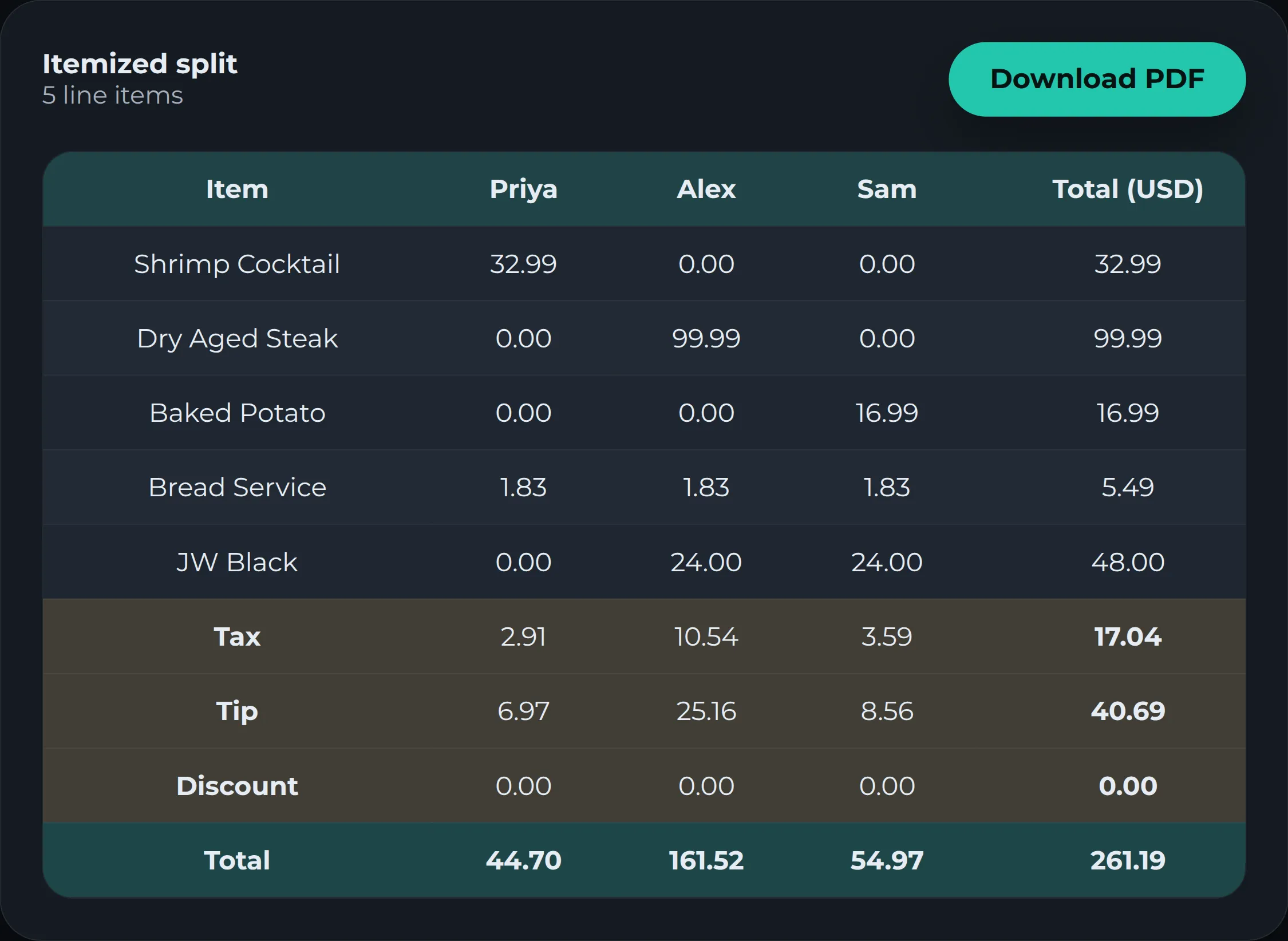
Food first. Each dish one person had goes straight to them. The bread splits three ways ($1.83 each) and the whisky two ways ($24.00 each for Alex and Sam). That gives Alex $125.82 in food, Priya $34.82 and Sam $42.82.
Then tax and tip, in proportion. Alex had 62% of the food, Priya 17% and Sam 21%, so they pay those shares of the tax and the tip:
| Food | % of food | Tax | Tip | Total | |
|---|---|---|---|---|---|
| Alex | $125.82 | 62% | $10.54 | $25.16 | $161.52 |
| Priya | $34.82 | 17% | $2.91 | $6.97 | $44.70 |
| Sam | $42.82 | 21% | $3.59 | $8.56 | $54.97 |
| Total | $203.46 | 100% | $17.04 | $40.69 | $261.19 |
Watch the pennies. Each person’s exact share of the tax has a fraction of a cent: Alex $10.5376, Priya $2.9162, Sam $3.5862. Round each one normally and you get $10.54 + $2.92 + $3.59 = $17.05 - a cent more than the $17.04 tax. So one person has to be rounded down instead. The fair pick is whoever is furthest from the next cent, which is Priya ($2.9162 becomes $2.91). The tip then comes out a cent short when rounded normally ($40.68), and since Priya was the one rounded down on tax, she picks up that spare cent: $6.97 instead of $6.96. Everything now matches the bill exactly. It’s a small thing, but it’s why splits done by hand so often end up “a few cents off”.
The faster way: scan the receipt
Doing this by hand means adding up every item, working out percentages and fixing rounding. PayMate does the whole thing from a photo of the receipt:
- No typing. It reads the items, prices, tax, tip and any discount straight off the receipt, and warns you if the items don’t add up to the printed subtotal.
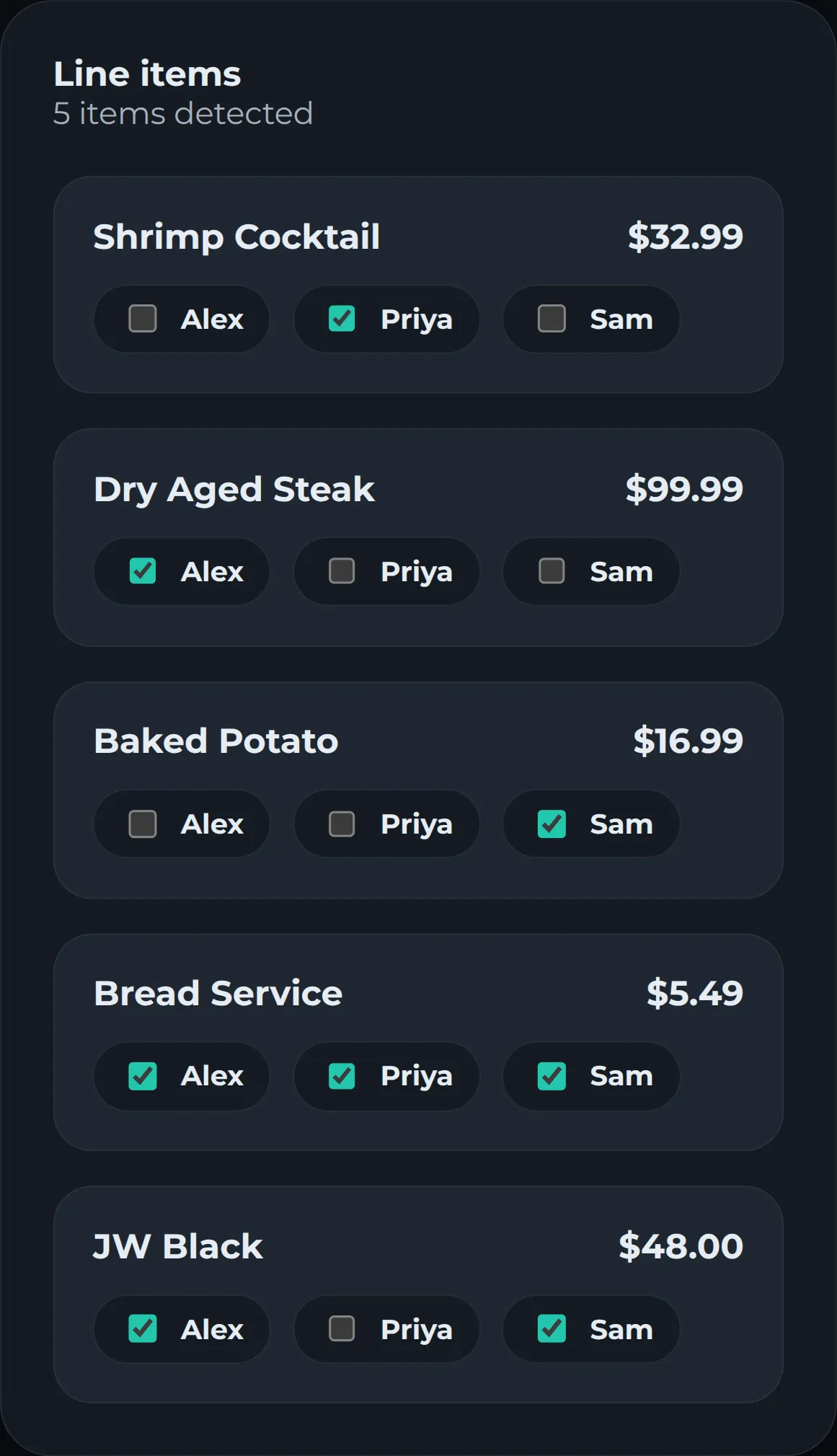
- Tap who had what. Assign each item to one person, several people, or the whole table. Split a bottle 60/40 or enter exact amounts when it isn’t even.
- Tax, tip and discounts are split for you, in proportion to what each person ordered - the method above.
- It always adds up. Leftover cents go to whoever has been rounded down the most, across the whole receipt, so every total matches the bill exactly.
- Nobody else needs the app. Type your friends’ names, then send them the totals as a PDF.
How it works
- Choose Scan a receipt and take a photo or upload it (JPEG, PNG or PDF).
- Check the items, and fix anything that was misread.
- Add the people at the table.
- Assign each item to who had it. Assign all covers everything shared.
- Pick who paid, give the bill a title, then save. You’ll see each person’s total, with their food, tax and tip broken out.
Splitting with the same people often?
If you split bills with the same friends, roommates or travel group, put them in a group. Every bill you split there updates a running balance of who owes whom, and you can record payments when people settle up. Each group has its own currency, so a trip abroad can be tracked in the local currency.
Frequently asked questions
Do you split tax and tip evenly?
Not if people ordered different amounts. Tax is charged on the food, and tip is usually a percentage of the bill, so both should follow what each person ordered. Splitting them evenly makes whoever ordered the least pay part of everyone else's tax and tip.
How do you split shared appetizers or a bottle of wine?
Divide each shared item among the people who had it, and add that amount to their food total before working out tax and tip. A starter the whole table ate is split across everyone; a bottle two people drank is split between those two. If it wasn't shared equally (say 60/40), give each person that share of the item.
What if someone only had a drink?
They pay for the drink plus tax and tip in proportion to it, which is small. That's exactly the case an even split gets wrong - they'd otherwise pay the same as someone who had a full meal.
How do you handle a discount or coupon?
Treat it like tax and tip in reverse - take it off each person's total in proportion to what they ordered. PayMate does this automatically when the receipt shows a discount.
Why doesn't my hand calculation add up to the bill?
Rounding. When each person's share is rounded to the cent on its own, the rounded amounts can come out a cent or two above or below the real total, so someone has to take the leftover cent. PayMate handles this for you and spreads those cents fairly across the whole receipt.
Does everyone need to download an app or make an account?
No. With PayMate only the person splitting the bill needs an account. You type the names of the people at the table, then send them the totals as a PDF.
Try it on your next bill
Scan a receipt and get each person's total, tax and tip included.
Get started free