Switching from Splitwise: a free alternative that keeps your balances
PayMate is a free Splitwise alternative that imports a Splitwise group from its CSV export, with every expense, payment and balance, and refuses the import if the balances don't match. Adding expenses is never limited or slowed down, and receipt scanning with item-by-item splitting is free, with 30 scans per account. On Splitwise's free plan you have to wait after a few expenses and are stopped for the day soon after, and receipt scanning needs Pro at $7.99 a month or $59.99 a year.
Updated
If you’re here, Splitwise probably just made you wait before adding another expense. You can move your groups to PayMate for free, with every expense, payment and balance coming over, so nobody has to start again.
Full disclosure: this is PayMate’s website. The Splitwise details come from using a free US account and Splitwise’s own Pro page in November 2026, and where Splitwise is the better pick, we say so.
What Splitwise’s free plan limits
Adding expenses. After three or four expenses, Splitwise makes you wait before you can add the next one. Keep going and it stops you for the day. That’s fine for a coffee here and there, but not for entering a weekend trip or a month of groceries in one go.
Receipts. Scanning a receipt and splitting it by item are both Pro features. So are currency conversion, charts and search.
Pro’s price. $7.99 a month or $59.99 a year in the US.
PayMate’s only limit is on receipt scans, 30 per account, because reading a receipt costs real compute. Adding an expense by hand costs nothing, so it’s never limited or slowed down.
PayMate vs Splitwise
| PayMate | Splitwise | |
|---|---|---|
| Price | Free | Free, or Pro at $7.99/mo or $59.99/yr |
| Adding expenses | No limit, no waiting | Wait timer after a few, then a daily limit |
| Receipt scanning | Free, 30 scans per account | Pro |
| Split a receipt by item | Free | Pro |
| Currencies | One per group | Several per group, conversion on Pro |
| Several people paying one expense | No | Yes |
| Fewest payments to settle up | Yes, “untangle debts” | Yes, “simplify debts” |
| Works offline | No | Yes |
| Ads | None | None seen on free |
| Apps | Web, works on any phone | iOS, Android, web |
How to move a group from Splitwise to PayMate
- Export the group from Splitwise. In the app, open the group and tap the Export pill at the end of the row under the group name. On the website, open the group, click the gear icon, then “Export as spreadsheet”. You’ll get a CSV file.
- Import it into PayMate. Sign up or log in, go to Groups, choose “Import from Splitwise”, pick the file and name the group. If your name in the file doesn’t match your PayMate name, you’ll be asked which person you are.
- Let PayMate check the math. It rebuilds everyone’s balance from the file and compares it to Splitwise’s own totals. If anyone is off by a cent, the import is refused, you see whose balance didn’t match, and nothing is saved.
What comes over: every expense with its date, who paid and each person’s share, every payment between members, and the group’s currency.
What stays in Splitwise: categories, comments and receipt photos, which aren’t in the export. Imported expenses come over as one amount each rather than line items, and a group that mixes currencies can’t be imported yet.
Everyone else in the group comes in as a member without an account. Invite them by email whenever you’re ready, and their history is waiting for them.
What’s different once you’ve switched
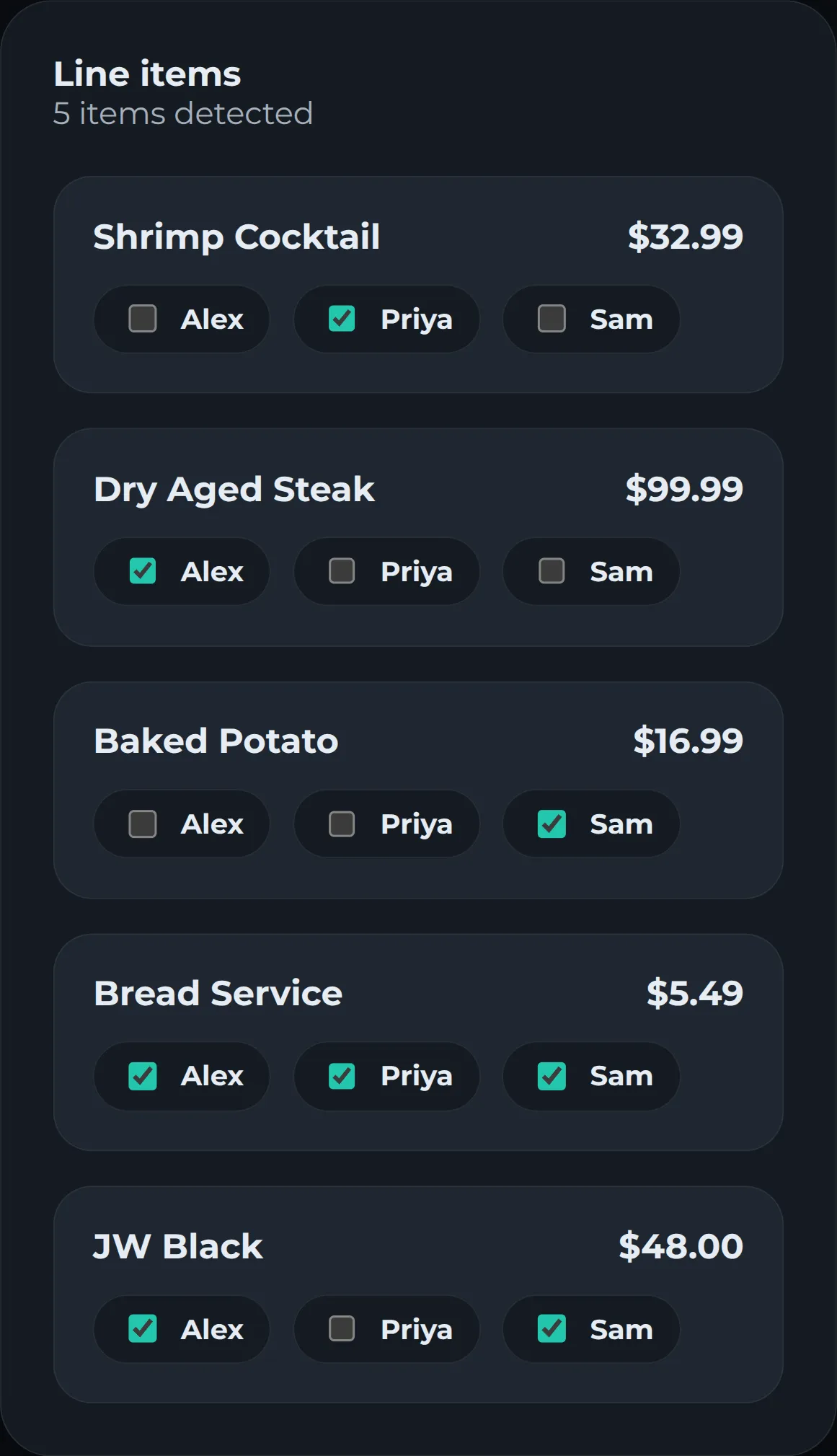
Receipts do the typing. Take a photo of the bill or upload a PDF, and PayMate reads every item, the tax and the tip. Tap who had what, and each person’s total comes out to the cent, with tax and tip shared in proportion to what they ordered (here’s why that’s fairer).
Quick splits for everything else. Rent, a cab, concert tickets: enter a title, an amount and who’s in. They don’t use a scan.
Settling up. When someone pays you back, record how they paid: cash, Venmo, Zelle, PayPal or bank transfer. Balances update for everyone in the group. Turn on “untangle debts” in a group’s settings and PayMate settles up in as few payments as possible: if Bob owes Dave $20 and Dave owes you $20, Bob just pays you.
When to stay on Splitwise, or try something else
PayMate isn’t the right fit for every group:
- You add a few expenses a week. The free plan’s limits won’t bother you, so there’s no reason to move.
- Your group often has several people paying one bill. Splitwise handles that, and so do Settle Up and Splid.
- You’re travelling across currencies or without signal. Tricount and Splid are free and work offline.
- You want open source. Spliit is free and open source, with no ads and no account.
If most of what you split comes with a receipt, PayMate is built for exactly that.
Frequently asked questions
Does Splitwise have a daily limit?
Yes. On the free plan, after three or four expenses Splitwise makes you wait before adding the next one, and soon after that it stops you until the next day. Splitwise Pro removes both. Splitwise doesn't publish the exact numbers.
Is Splitwise still free?
Splitwise has a free plan with a wait timer and a daily expense limit. Receipt scanning, itemization, currency conversion, charts and search are Pro features, at $7.99 a month or $59.99 a year in the US (checked in November 2026).
Will my balances be the same after moving from Splitwise?
Yes. PayMate rebuilds every person's balance from the expenses and payments in the file and compares it to Splitwise's own totals. If anyone is off by even a cent, the import is refused and nothing is saved.
Do my friends need to sign up to see the imported group?
No. Everyone in the file comes in as a group member without an account. Invite them by email whenever you like, and their history is already there when they join.
Can I import a Splitwise group that uses more than one currency?
Not yet. Each PayMate group has one currency, so an export that mixes currencies is rejected with the line numbers that differ. Groups in a single currency, in any of the currencies PayMate supports, import fine.
Is there a free app that scans receipts and splits them by item?
Yes. PayMate reads the items, tax and tip from a photo or PDF of the receipt, lets you tap who had what, and shares tax and tip in proportion to what each person ordered. Every account includes 30 receipt scans, and adding expenses by hand doesn't use one. On Splitwise, receipt scanning and itemization are Pro features.
Try it on your next bill
Scan a receipt and get each person's total, tax and tip included.
Get started free